Tuesday, February 23, 2010

Week #4 - Play Week!

***Thing #9 - Play Around With An Online Image Generator

Most of us don’t have the time or the artistic talent to create specialized graphics or logos for projects. Enter the Online Image Generator! These fun tools let you create many types of images – framed pictures, slide shows, comic-style captions, trading cards, calendars and much more.

This exercise is all about FUN!

Why use this tool? Create trading cards of authors, scientists, historical figures, or even concepts you’re trying to teach or promote.

Graphics are a great way to convey information and can add some fun and creativity to your blog, website and more. Create customized images for your PowerPoint presentations, Web pages, and other projects. The possibilities are endless! As is the time you can spend playing around with these sites—beware!

1. Play around with some of the image or text generators and find one that you like.
2. Create an image.
3. Upload the image to your blog to share with others (be sure to include a link to the image generator itself so other participants can discover it too.) Adding the image you mocked up to your blog may be as simple as copying and pasting code that the page provides. If not, you may just need to right click on the image and then save it to your hard drive before using Blogger’s image button to add it to your post.

Resources

***Thing #10 - Roll Your Own Search Tool Using Rollyo

Do you have a group of websites that are your favorites? Or a set of online resources that are similar that you frequently use to find answers? Well Rollyo may be the tool for you. Rollyo allows you to create your own search tool for the websites you know and trust.

Take a look at some of these search rolls that have already been created:

http://www.rollyo.com/explore.html


  1. Explore Rollyo and create an account for yourself.
  2. Create a search roll for any subject you like.
  3. Add a link to your search roll in your blog.


***Thing #11 - Explore Glogster and Share Your Poster Through Your Glog

Glogster is a fairly new service that allows users to create free multimedia posters. For an example of how businesses can use this technology, click here to visit an advertisement for Google's new Zurich office.

For this Thing, visit Glogster (www.glogster.com) and experiment with creating your own personal or business glog. There are many examples of glogs on the site, so feel free to wander around. Post your glog to your blog and tell us about it.

Tuesday, February 16, 2010

Week #3 - RSS Feeds

***Thing #7 - Discover RSS Feeds

You’ve heard of RSS? You’ve seen those small funny tags on websites? You’ve heard co-workers and acquaintances swear by it, but still have no idea what RSS is? Well don’t worry, according to a recent survey you’re still in the majority, but this is changing rapidly. In the information world, RSS is not only revolutionalizing the way news, media and content creators share information, but it also is swiftly changing the way everyday users are consuming information.

RSS stands for “Really Simple Syndication” and is a file format for delivering regularly updated information over the web.

Just think about the websites and news information sources you visit every day. It takes time to visit those sites and scour the ad-filled and image-heavy pages for just the text you want to read, doesn’t it? Now imagine if you could visit all those information sources and web pages in just one place and all at the same time … without being bombarded with advertising… without having to search for new information on the page you’d already seen or read before… and without having to consume a lot of time visiting each site individually. Would that be valuable to you? Well, it’s available now through a newsreader and RSS.

This week’s discovery exercises focus on learning about RSS news feeds and setting up a Bloglines account (a free online newsreader) for yourself to bring your feeds together.

Discovery Resources:


Discovery Exercise:

  1. Follow the discovery resources above to learn more about RSS and newsreaders.
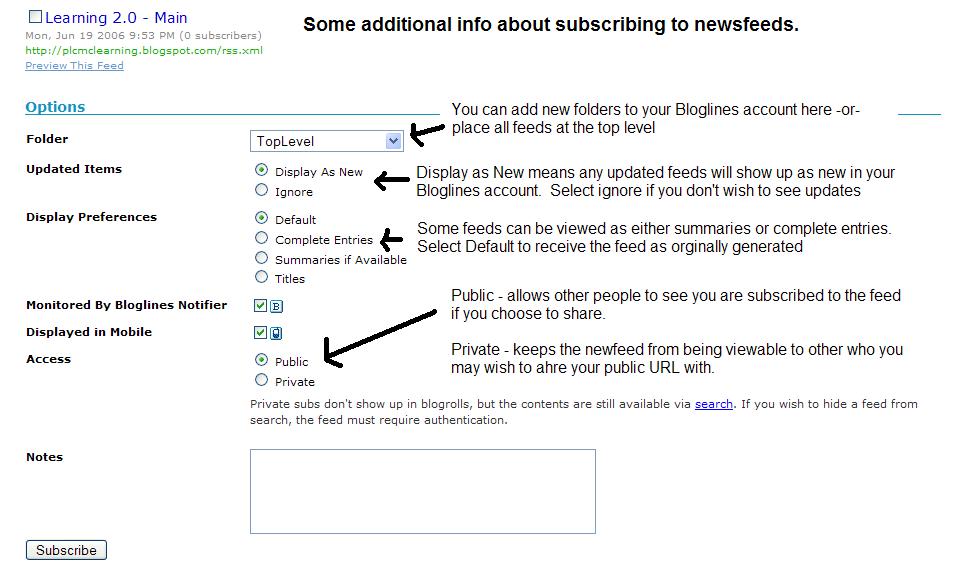
  2. Create a free online Bloglines account for yourself and subscribe to at least 10 newsfeeds to your reader. See Using Bloglines Tutorial steps 1-3 for instructions.
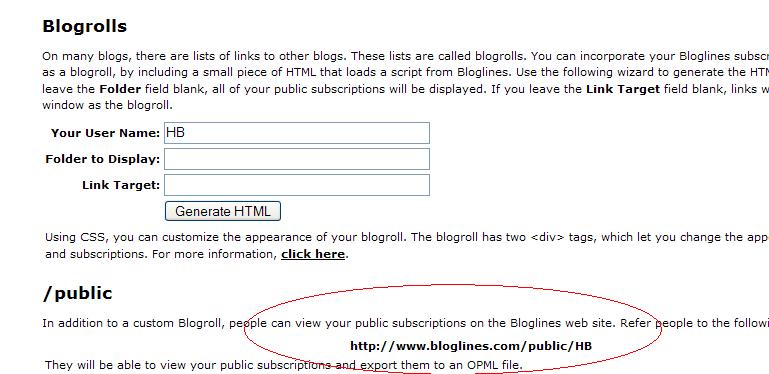
  3. Create a post in your blog about this exercise. Optional: If you're up to the challenge, you can provide the URL address to your public bloglines account (find where to find this below)


Don’t know what to blog about? Think about these questions:
What do you like about RSS and newsreaders?
How do you think you might be able to use this technology in your work or personal life?
How can libraries use RSS or take advantage of this new technology?


How to find your public Bloglines URL:
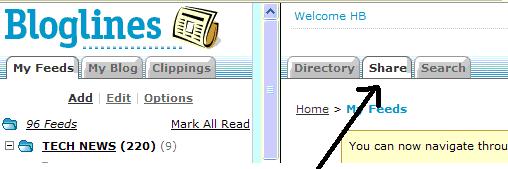
  1. Click on the Share tab within your Bloglines account:
  2. Scroll down the right screen pane and locate the public URL (see screenshot)

  3. Be sure to add this as part of your post to demonstrate your completion of this activity.
***Thing #8 - Subscribe to Our RSS Feed

Make sure you subscribe to the RSS feed for Ephrata Public Library's 23 Things and also for the library's activites.

Tuesday, February 9, 2010

Week #2 - Photos and Images

Thing #4 - Explore Flickr

Photo sharing websites have been around since the 90s, but it took a small startup site called Flickr to catapult the idea of “sharing” into a full blown online community. Within the past year, Flickr has become the fastest growing photo sharing site on the web and is known as one of the first websites to use keyword “tags” to create associations and connections between photos and users of the site.

For this discovery exercise, you are asked to take a good look at Flickr and discover what this site has to offer. Find out how tags work, what groups are, and all the neat things that people are using Flickr for.

Thing #5 - Have Some Flickr Fun and Discover Flickr Mashups and Third Party Sites
Thing #6 - Post a Photo You've Found on Flickr To Your Blog and Write About It!


Take a good look around Flickr and discover an interesting image that you want to blog about. Be sure to include either a link to the image or, if you create a Flickr account, you can use Flickr's blogging tool to add the image in your post. Another option you have for including images in your post is to use Blogger's photo upload tool.

A quick word about photo posting etiquette:
When posting identifiable photos of other people (especially minors) is it advisable to get the person's permission before posting their photo in a publicly accessible place like Flickr. Never upload pictures that weren't taken by you (unless you have the photographer's consent) and always give credit when you include photos taken by someone else in your blog.